
All content on this website is provided solely for educational and demonstration purposes. Any software downloaded from this site is not intended for commercial use or broad distribution. You are solely responsible for ensuring compliance with all applicable license agreements and laws.
If you appreciate a particular program, we strongly encourage you to purchase the official version and support its developers. They invest significant time and effort into creating these tools and, unlike many others, cannot work for free — they need to earn a living. Consider leaving a comment, sharing, or otherwise supporting those who work hard for you.
KeenTools GeoTracker for Blender Download (Latest 2026) – install the professional geometry-based tracking add?on for Blender 2.80+ and get precise 3D object & camera alignment, even with minimal camera data.
GeoTracker transforms Blender into a serious VFX workbench by letting you track real objects from live?action footage using 3D models instead of just feature points. Instead of struggling with shaky markers or mismatched motion, you align a mesh, lock it to the video, and let GeoTracker refine the movement frame by frame inside Blender itself. This makes it perfect for inserting 3D props, restoring damaged shots, or pre?vising camera moves without leaving your main DCC.
What GeoTracker Actually Does
GeoTracker is part of the KeenTools ecosystem built around geometry?based tracking, not just 2D point cloud math. You feed it a video clip and a 3D object (or a car model, a head, a simple cube), and it matches the model’s motion to the footage by iterating over the visible edges and surfaces. That’s why it handles partial occlusions, reflections, and even badly fitting geometry much better than standard Solve?Camera?From?Movie workflows.
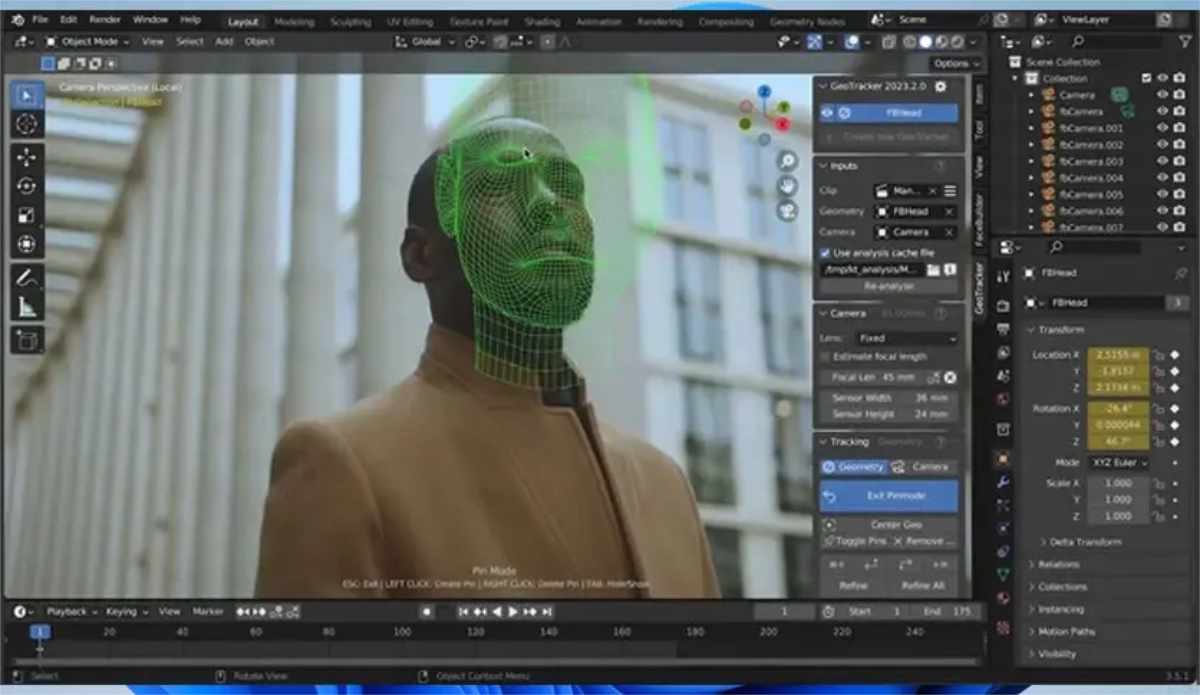
In practice, this means:
- You can track an object through a shot where traditional tracking would fail because of blur or missing features.
- You can align a camera to a scene using a rough stand?in model, then swap in the final mesh later.
- You can texture that same object directly from the video, baking realistic dirt, wear, and lighting straight onto the mesh.
Setup and Workflow in Blender
GeoTracker runs as a regular Blender add?on for Blender 2.80 and newer, officially on Windows, Linux, or macOS (Intel or Apple Silicon), as long as you use the 64?bit version from blender.org. You install it via Edit ? Preferences ? Add-ons ? Install…, then choose the .zip from your downloads; macOS users first mount the .dmg and grab the inner ZIP.
Once it’s loaded, you get a GeoTracker panel in the 3D viewport sidebar. From there you:
- Load your video clip into a Blender movie clip.
- Place your 3D model roughly in the right position and orientation.
- Define pins or regions on the model that should match the footage.
- Let GeoTracker compute the pose over time, then refine keyframes manually if needed.
This workflow stays entirely inside Blender, so you don’t need to export to Nuke or After Effects just to tweak a shot.
Geometry?Based Tracking vs Old?School Methods
Classic camera tracking in Blender relies on tracking sparse 2D points and reconstructing a 3D transform from those. That’s fine for simple shots, but breaks when markers are missing, blurred, or moving differently from the actual object.
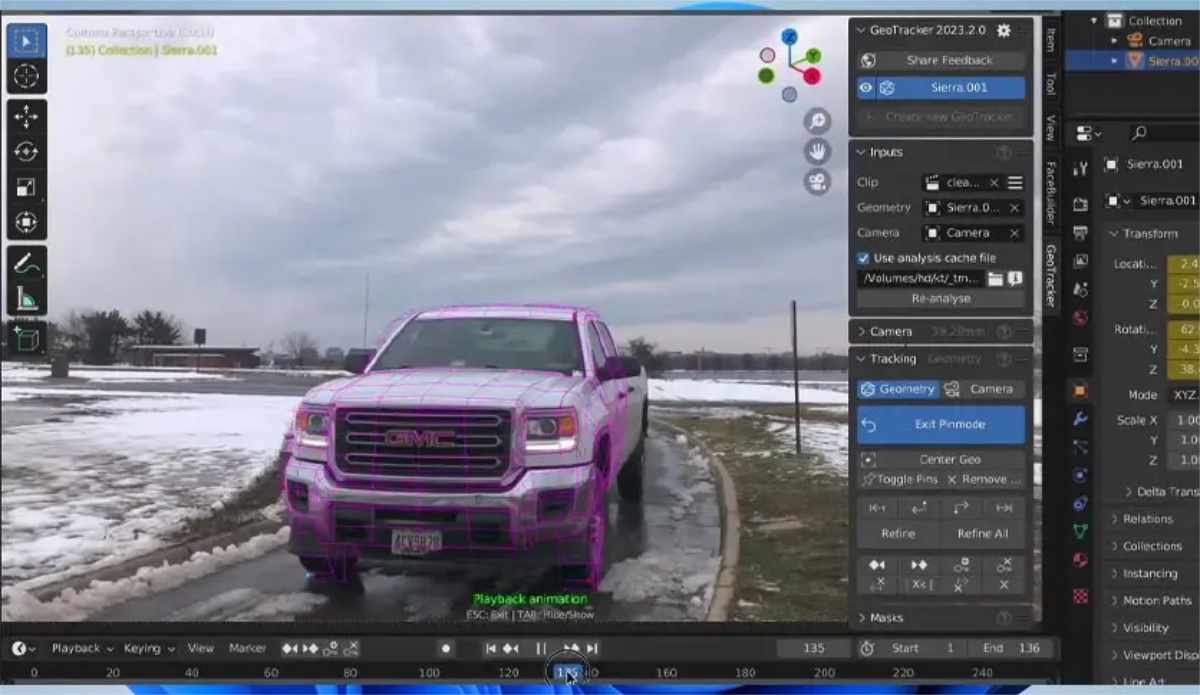
GeoTracker instead:
- Uses the 3D mesh as a constraint, so the software “knows” how the object should move in space.
- Continuously compares the rendered edges or shaded view of the model with the incoming video.
- Lets you mask out distracting or unreliable parts of the frame (windows, reflections, wires) so they don’t confuse the solver.
For VFX artists, that means fewer failed shots, less manual roto, and more time spent on actual compositing.
Masks, Focal Length, and Zoom
GeoTracker brings two masking layers to keep your solves clean: 2D composite masks and 3D surface masks. The 2D layer hides parts of the video (for example, a passing car or a reflection), while the 3D layer hides specific polygons on the model without changing the geometry. Both help you exclude noisy or irrelevant surfaces that could throw off the tracking.
If you don’t know the camera specs, GeoTracker can estimate focal length automatically and even handle zoom shots by tracking the focal?length change over time. That’s extremely useful for smartphone footage or run?and?gun productions where nobody logged the lens settings.
Texturing and Exporting Results
One of the underrated strengths of GeoTracker is its built?in texturing system. You can project the video onto the tracked model, clean up the UVs, and bake a texture directly inside Blender, saving hours compared to exporting to dedicated texturing tools. This works especially well for architectural elements, props, or vehicles that need to match the lighting and wear of a real set.
Tracking results are also pipeline?ready: you can export camera and object transforms in formats compatible with other animation software. So if you later move to a heavier pipeline (for example, Maya or Nuke), the motion data travels with you.
FaceBuilder Heads and Pipeline Fit
If you already use FaceBuilder inside Blender, GeoTracker becomes a no?brainer add?on. You can create a custom head in FaceBuilder, then track that head directly in the same scene, which is perfect for replacement shots, lip?sync, or performance capture. The workflow is designed to slot into real?world pipelines, not just proof?of?concept demos.
Pricing, Licensing, and Trial
GeoTracker is free to install and use for 15 days with no limits, after which you need a subscription for the tracking module in KeenTools Core Library. KeenTools offers Freelancer (monthly or annual) and Studio annual plans, all valid for commercial work. If you already own GeoTracker for Nuke or After Effects, the same license can cover Blender on the same machine.
FaceBuilder for Blender, however, requires a separate license, but you can mix them together inside one Blender project.
⬇️ How to download
It's easy, but here's how it actually works:
- Pick your version from the list.
- Hit the Download button – you'll be taken to a file host.
- ⚠️ Important: disable your AdBlocker – otherwise the site might not work properly.
- If you're on a free or temporary plan, you'll see a 30‑second timer – just wait it out.
- After the timer ends, the real download button appears. Click it and get your file.
✅ No extra installers, no hidden registrations – just a short wait.
🙏 And hey – if you appreciate what we're doing, consider supporting us. This site runs on ads, nothing malicious, just honest help for the community. Every click helps keep the project alive.
💬 Community & Support
We sincerely appreciate everyone who supports our website and shows interest in our work.
Your comments and interaction on the site really help our project grow and reach more 3D artists around the world 🌍.
We also have a Telegram channel — where we share updates, exclusive content, and materials that are not available on the website.
If you're looking for something specific — especially assets for Unity Engine or large 3D model packs that haven't yet been published due to their size — you can leave your request there, and if the files are available, we'll provide a direct download link.
Thank you for being part of our community and helping us keep this creative space alive ❤️
🚀 Join Our Telegram Channel
Get early access to new 3D models, exclusive Unity assets, and behind-the-scenes content.
🔗 Join Telegram💡 Your activity helps us grow — every visit, comment, and share makes a real difference.
We're truly grateful for your support and curiosity 🙏