
All content on this website is provided solely for educational and demonstration purposes. Any software downloaded from this site is not intended for commercial use or broad distribution. You are solely responsible for ensuring compliance with all applicable license agreements and laws.
If you appreciate a particular program, we strongly encourage you to purchase the official version and support its developers. They invest significant time and effort into creating these tools and, unlike many others, cannot work for free — they need to earn a living. Consider leaving a comment, sharing, or otherwise supporting those who work hard for you.
Let’s be brutally honest. You saw a flashy YouTube video titled “FREE LOCAL AI AGENT” and got excited. You thought, “Finally, an AI that will sort my files, read the news, and remind me about meetings without a monthly subscription.” You downloaded Hermes, Jarvis, OpenClaw, Iron Claw, Odysseus, or Goose. You installed Open WebUI.
And then reality hit you like a freight train.
You open the agent, ask it to create a folder on your desktop, and it hits you with: “I’m sorry, I cannot manage your local files.” You ask it to find today’s news and send it to your Telegram. The response? “I’m sorry, I cannot access the internet.”
To make it work, the documentation tells you to write a Python script or use JavaScript. Wait a second. If I have to write the code to make the agent work, why the hell do I need the agent in the first place? I could just write the script myself and skip the bloated middleman.
This isn’t a technological revolution. This is the post-crypto cash grab. It is the Era of AI Extortion.
The Illusion of Control: A Car Without an Engine
These developers are handing you a beautifully painted car chassis. It has leather seats, a steering wheel, and a shiny dashboard. But there is no engine. When you ask how to drive it, they tell you: “Oh, the engine is sold separately. You need to rent an engine from OpenAI, Anthropic, or Grok.”
They give you a free graphical interface—a completely useless shell—because they know you will eventually hit a wall. The agent refuses to search the web. The agent refuses to touch your local system. In a fit of rage and desperation to make the “free” tool work, you cave. You pull out your credit card, buy an API key from a massive corporation, and suddenly the agent works.
You just paid to automate your calendar. You paid real money so an AI could read an RSS feed. It is absolute, unadulterated madness.
The Local Model Nightmare: The Goose & Ollama Trap
Let’s talk about the “free” route. Developers like Goose claim you can connect a local model like Ollama and use the agent completely offline for zero dollars. It sounds too good to be true because it is.
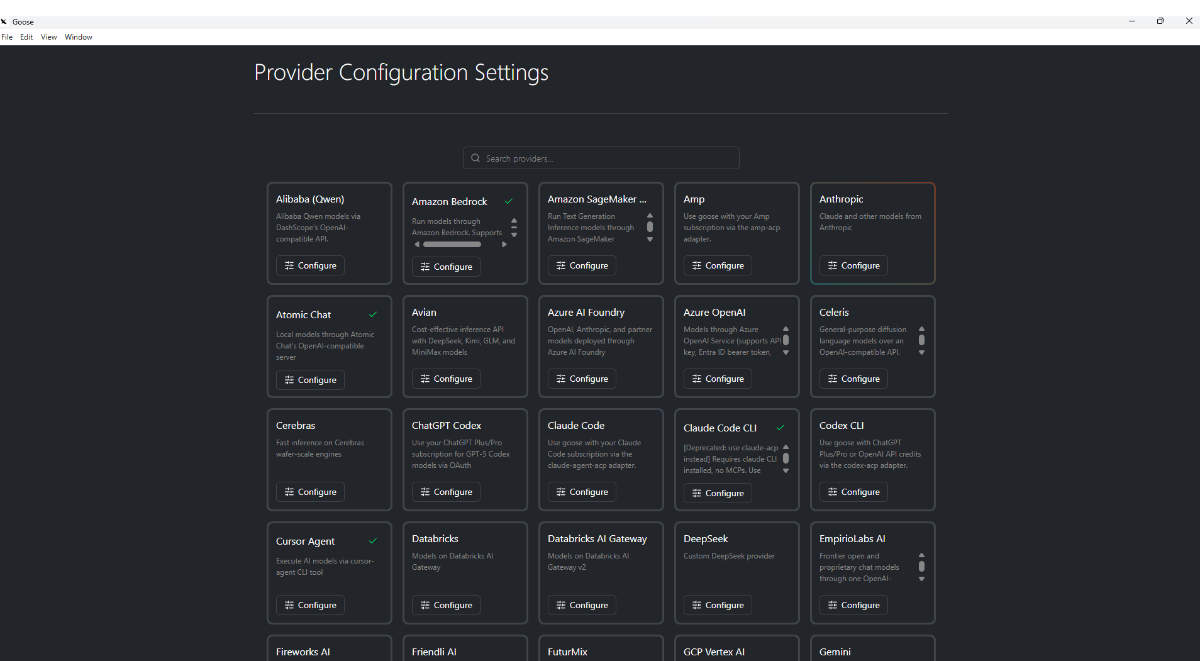
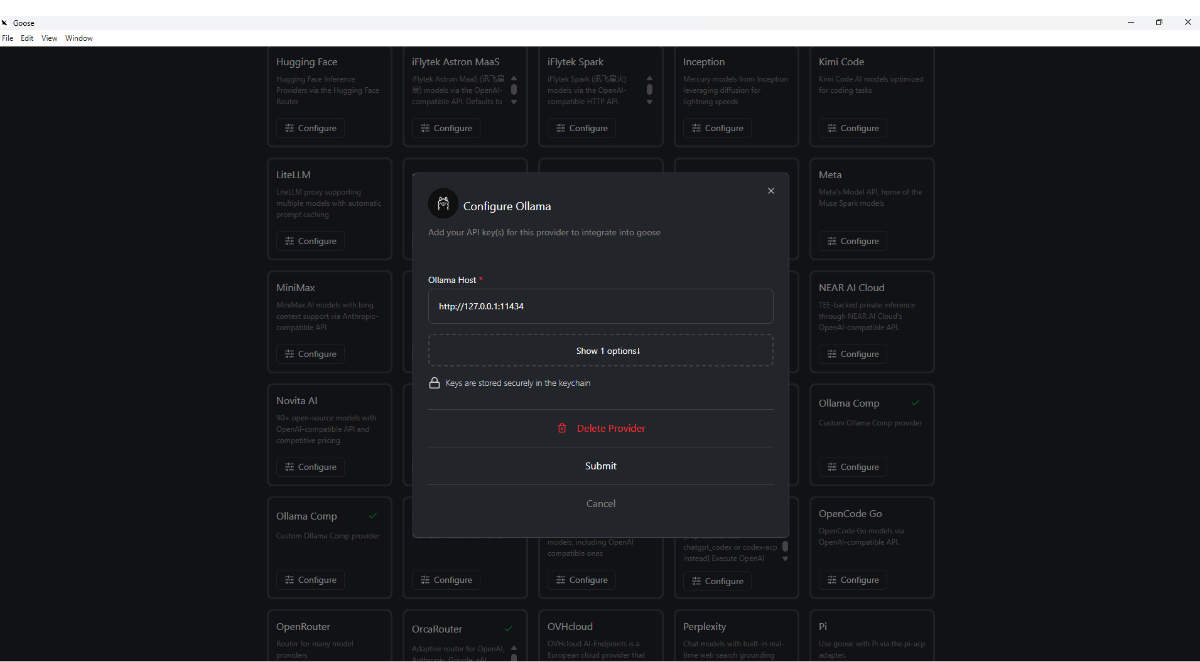
Take the Goose AI agent for example. When you try to configure it with Ollama, it hardcodes the endpoint to 0.0.0.0:11434. On a Linux machine, this means “listen on all addresses,” which is fine. But on a Windows machine? Windows loses its mind. It doesn’t know how to route that.
You go into the settings, change it to 127.0.0.1:11434 or localhost:11434, click “Apply,” and watch it instantly revert back to 0.0.0.0:11434. I personally spent three days pulling my hair out. I had to dig through the terminal, rewrite system environment variables, and hardcode the host file just to force the software to see my local Ollama instance.
I know how to do that. But what about the average guy? What about the artist, the writer, or the small business owner who just wants an AI assistant? They don’t know what a system variable is. They hit that error, realize the local setup is intentionally broken or poorly ported, and out of pure exhaustion, they buy an OpenAI API key.
The system is rigged. Every single agent is coded from the ground up to funnel you toward paid providers.
The YouTube Grifters: Scammed Twice Over
The real venom in this ecosystem comes from the tech YouTubers. You know the ones. They have thumbnails with laser eyes and giant green text screaming: “INSANE FREE AI AGENT!!!”
You click the video. They give you a 10-minute tutorial showing how amazing the agent is. They hype it up. And then, at minute 8:45, they casually drop the bomb: “Oh, by the way, to make it actually do anything, you just need to grab an API key from Claude or OpenAI.”
You just got scammed twice. First, the YouTuber got their ad revenue from your view. Second, they funneled you into a paid subscription trap where their corporate partners make money off your frustration. It is a disgusting symbiosis designed to milk the average person dry.
People are acting like zombies, throwing money at API tokens just to have an AI tell them the weather or remind them to wake up. It’s a bubble. Remember when everyone was making useless crypto tokens? Remember the Tap games on Telegram where you clicked a screen for three months hoping to get $5? This is the exact same thing, but with a shinier, “tech-bro” wrapper.
The Ultimate AI Agent FAQ (Your Burning Questions Answered)
Search engines and AI assistants are flooded with desperate users trying to fix their broken AI agents. Here are the raw, unfiltered answers to the most common questions.
I installed a free AI agent but it says it can’t access the internet. Why? Because internet access requires a tool/function-calling feature. Most “free” agents intentionally restrict this feature to local models because they want you to switch to a paid cloud model (like GPT-4) that natively supports it. They broke your local experience on purpose to upsell you.
Every AI agent I download asks for an API key. Are there any truly free ones? No. While the software itself might be open-source (like Open WebUI or Goose), the “brain” required to run the tools is almost always locked behind a paid API. To get a truly free experience, you must run a local model (like Llama 3 via Ollama) and manually configure it, which is notoriously difficult and buggy on Windows.
Why won’t my AI agent create folders or manage my local computer files? Security and corporate liability. Developers are terrified of an AI accidentally deleting a user’s system files, so they disable local file execution by default. To make an agent touch your local files, you usually have to write custom Python scripts or enable dangerous permission flags in the config files.
Is the AI agent boom just a scam like the crypto boom? Functionally, yes. The “boom” is driven by developers creating empty wrappers (GUIs) that force users to pay per token to major AI providers. It is an extraction economy. They give you the shell for free and charge you a premium for the engine.
Why does Goose keep reverting my Ollama IP to 0.0.0.0:11434 on Windows? This is a known bug/oversight in how the Goose configuration file handles local host binding. On Windows, 0.0.0.0 often fails to route to the local loopback. You must bypass the GUI, open your system environment variables, and globally set OLLAMA_HOST to 127.0.0.1:11434, or manually edit the agent’s config file outside the application.
Can I use a local AI to read the news and send it to Telegram without coding? Not out of the box. Almost no free local agent supports seamless, no-code integration with Telegram or live web scraping. You will have to write a Python script using the requests library and an API wrapper to achieve this. If you have to code it yourself, you don’t need an “agent.”
Why do I have to pay for API keys if the agent software is free? Because the agent software is just a frontend interface. It doesn’t possess any intelligence. The intelligence (the LLM) is hosted on massive server farms owned by OpenAI, Anthropic, or Grok. They charge you for every word (token) the AI processes. The agent developers often get affiliate kickbacks for referring you to these paid services.
Are OpenAI, Anthropic, and Grok intentionally making local AI hard to use? The major corporations aren’t directly breaking your local software, but they fund the ecosystem. By making their models incredibly powerful but closed-source, they force the market to build wrappers around them. The result is a generation of AI agents built entirely around cloud APIs, with local model support treated as an afterthought.
What is the best way to set up a completely free local AI agent without coding? Use AnythingLLM combined with Ollama. It is currently one of the few setups that genuinely works locally without forcing you to write Python scripts. Install Ollama, pull a model like llama3, install AnythingLLM, and select Ollama as your LLM provider in the settings. It still won’t manage your local files perfectly, but it won’t beg for an API key every five seconds.
What People Are Actually Saying (Community Reviews)
“I spent 4 hours trying to get Hermes to read a PDF on my desktop. Four hours. It kept telling me it didn’t have permission. I finally got it working, and it used an OpenAI key that cost me $0.50 to summarize a single page. I could have read the page in two minutes.” — Reddit User, r/LocalLLaMA
“The YouTube tutorials are criminal. They show these agents doing magic, but the second you install it, it’s just a chatbot in a fancy window. It can’t click my mouse, it can’t open Chrome. Total waste of time.” — Discord User, AI Builders Server
“Goose claiming to support Ollama is a joke. The UI is broken, it overrides my localhost settings, and the documentation tells you nothing. I gave up and just went back to ChatGPT.” — GitHub Issue Comment
⬇️ How to download
It's easy, but here's how it actually works:
- Pick your version from the list.
- Hit the Download button – you'll be taken to a file host.
- ⚠️ Important: disable your AdBlocker – otherwise the site might not work properly.
- If you're on a free or temporary plan, you'll see a 30‑second timer – just wait it out.
- After the timer ends, the real download button appears. Click it and get your file.
✅ No extra installers, no hidden registrations – just a short wait.
🙏 And hey – if you appreciate what we're doing, consider supporting us. This site runs on ads, nothing malicious, just honest help for the community. Every click helps keep the project alive.
💬 Community & Support
We sincerely appreciate everyone who supports our website and shows interest in our work.
Your comments and interaction on the site really help our project grow and reach more 3D artists around the world 🌍.
We also have a Telegram channel — where we share updates, exclusive content, and materials that are not available on the website.
If you're looking for something specific — especially assets for Unity Engine or large 3D model packs that haven't yet been published due to their size — you can leave your request there, and if the files are available, we'll provide a direct download link.
Thank you for being part of our community and helping us keep this creative space alive ❤️
🚀 Join Our Telegram Channel
Get early access to new 3D models, exclusive Unity assets, and behind-the-scenes content.
🔗 Join Telegram💡 Your activity helps us grow — every visit, comment, and share makes a real difference.
We're truly grateful for your support and curiosity 🙏